
USE CASES
Seven reference use cases for the leaders who own security, technology, cost, strategy, integration, operations and AI. Each one starts from a blind spot, shows what 7lens connects, and ends with the questions you can finally answer.
Security Lens
Security perspective of your company.
Who is it for?
Chief Security Officers, CISOs and cybersecurity teams.
The problem
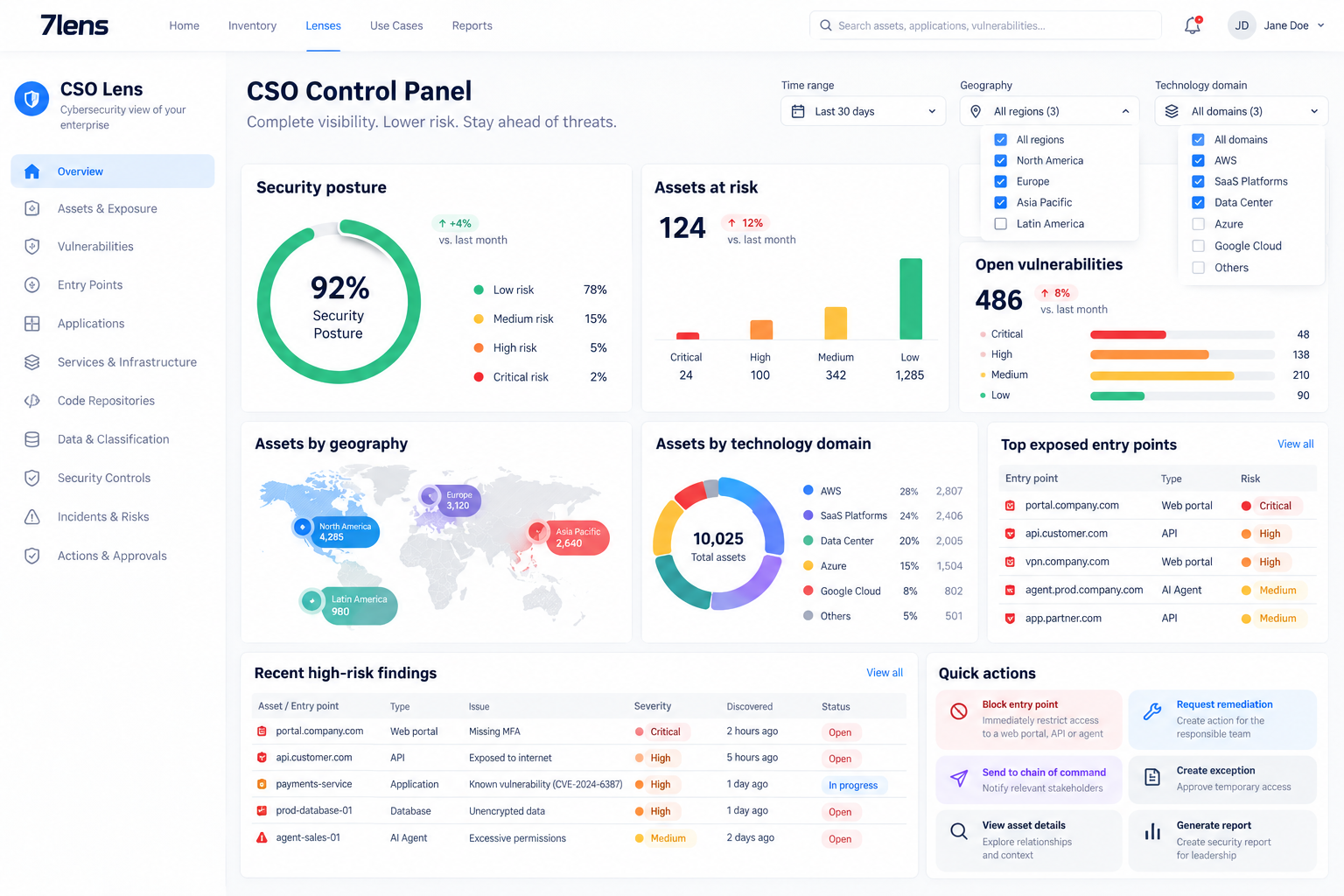
Modern organizations face an increasingly sophisticated attack environment, including attacks involving highly orchestrated AI-agent systems. But one of the fundamental problems for security teams is much simpler. Enterprise inventories are often incomplete, fragmented and distributed across many systems. Security teams may have information about applications in one place, infrastructure somewhere else, APIs somewhere else, code repositories somewhere else, and security controls in yet another system. The organization may technically possess the data, but it does not have a unified semantic understanding of its technology estate.
You cannot protect what you don’t know you have.
What 7lens connects
The Security Lens brings these elements together and organizes them according to the organization’s semantic model and ontology, so their relationships become understandable: Applications, Services, Offerings and Platforms from the model, and the Assets in Inventory that evidence them, such as servers, containers, APIs, repositories and AI agents. Security context can then be attached throughout those relationships.
- Applications
- Services
- Service offerings
- Platforms
- Servers
- Containers
- APIs
- Web portals
- AI agents
- Code repositories
- Libraries
- Application data
- Data classifications
- Technology
- Ownership
- Security attributes
- Exposure points
- Security controls
- Internet
- Web Portal
- API
- Application
- Service
- Infrastructure
- Data
The outcome
The CSO can answer the questions that matter: What applications do we actually have? Which are exposed? Which web portals are exposed to the Internet? Which APIs are exposed? How is each entry point protected? Is MFA used? Is there a WAF and how is it configured? Which application, service or data sit behind that entry point? Where are the vulnerabilities and what assets could be affected? The result is a far more complete, contextual understanding of the attack surface.
The value
The value is speed, completeness and context. 7lens rapidly ingests distributed enterprise information, normalizes it, and organizes it to the semantics security teams need. The customer does not have to manually build a perfect inventory first.
CTO Governance Lens
Is the technology estate production-ready and under control?
Who is it for?
Chief Technology Officers and the architecture, platform and operations leaders responsible for the technology estate.
The problem
The technology estate is large and distributed, and the CTO is accountable for whether it is understood, governed and production-ready. But the technology catalog is usually viewed in isolation, disconnected from the applications and business areas it supports, so lifecycle, standards and operational governance are hard to assess across the whole estate.
You cannot govern an estate you can only see one system at a time.
What 7lens connects
The CTO Governance Lens organizes the technology estate against the 7lens Ontology — Stack, Service and Offering — and connects it to the applications and business areas it supports, so technology capabilities are understood in their business and organizational context rather than as a catalog in isolation.
- Technology
- Services
- Offerings
- Platforms
- Applications
- Standards and compliance
- Lifecycle state
- Operational governance
- Stack
- Service
- Offering
- Application
- Business area
The outcome
The CTO can see whether the technology estate is production-ready and under control: what exists, how it is structured and governed, whether it meets defined standards, where it sits in its lifecycle, and which applications and business areas depend on it.
The value
Technology capabilities are understood in their business and organizational context, so governance, standards and operational control apply to the whole estate instead of one system at a time.
CFO Capital Lens
Where does technology spend leak, and what does it do to the business?
Who is it for?
Chief Financial Officers and finance leaders responsible for technology cost, investment and business value.
The problem
The CFO sees technology spend as a financial number, but not what that spend actually supports. Cost, applications, services, business areas and organizational entities live in different systems, so it is hard to relate investment to business value or to find where spend leaks without delivering a return.
Spend only means something when it is related to the technology, applications and business it supports.
What 7lens connects
The CFO Capital Lens relates technology spend to the Context: the technology, applications, services, business areas and organizational entities the spend actually supports, so cost is read against business value rather than as an isolated financial figure.
- Technology cost
- Applications
- Services
- Business areas
- Organizational entities
- Technology investment
- Business value
- Efficiency and cost optimization
- Spend
- Technology
- Application
- Business area
- Business value
The outcome
The CFO can see where technology spend leaks and what it does for the business: which applications, services and business areas each cost supports, where investment delivers value, and where cost can be optimized — instead of an isolated financial number.
The value
Technology spend is related to the technology, applications and business areas it actually supports, so the CFO can connect cost to business value and target efficiency where it matters.
CIO Strategy Lens
How do delivery and spend connect to the organization’s plans?
Who is it for?
Chief Information Officers and technology leadership responsible for aligning technology with enterprise strategy.
The problem
Enterprise strategy, technology strategy, technology investment and delivery live in separate systems and conversations. The CIO is accountable for whether technology execution and spend actually advance the organization’s plans, but the connection between strategic intent, investment, delivery and business outcomes is hard to see when each sits in its own tool.
Investment and execution only mean something when you can read them against intent.
What 7lens connects
The CIO Strategy Lens reads the shared Context so delivery and technology spend can be seen against the organization’s strategic plans, priorities and risks — not as isolated numbers.
- Enterprise strategy
- Technology strategy
- Technology investment
- Delivery and execution
- Business outcomes
- Technology risk
- Priorities
- Strategy
- Priorities
- Investment
- Delivery
- Business outcome
The outcome
The CIO gets a connected view of whether technology investment and execution are aligned with the organization’s strategic direction: which plans are funded and delivering, where spend is disconnected from priorities, and where technology risk sits relative to the plan.
The value
Delivery and spend stop being isolated numbers. They are read against the organization’s plans, so the CIO can show where technology is advancing strategy and where it is not.
Lock-In Free Lens
Own your enterprise semantics. Integrate with any tool. Avoid vendor lock-in.
Who is it for?
Enterprise architecture, technology leadership, CTO, CFO, CISO, and anyone responsible for consistency across multiple technology-management platforms.
The problem
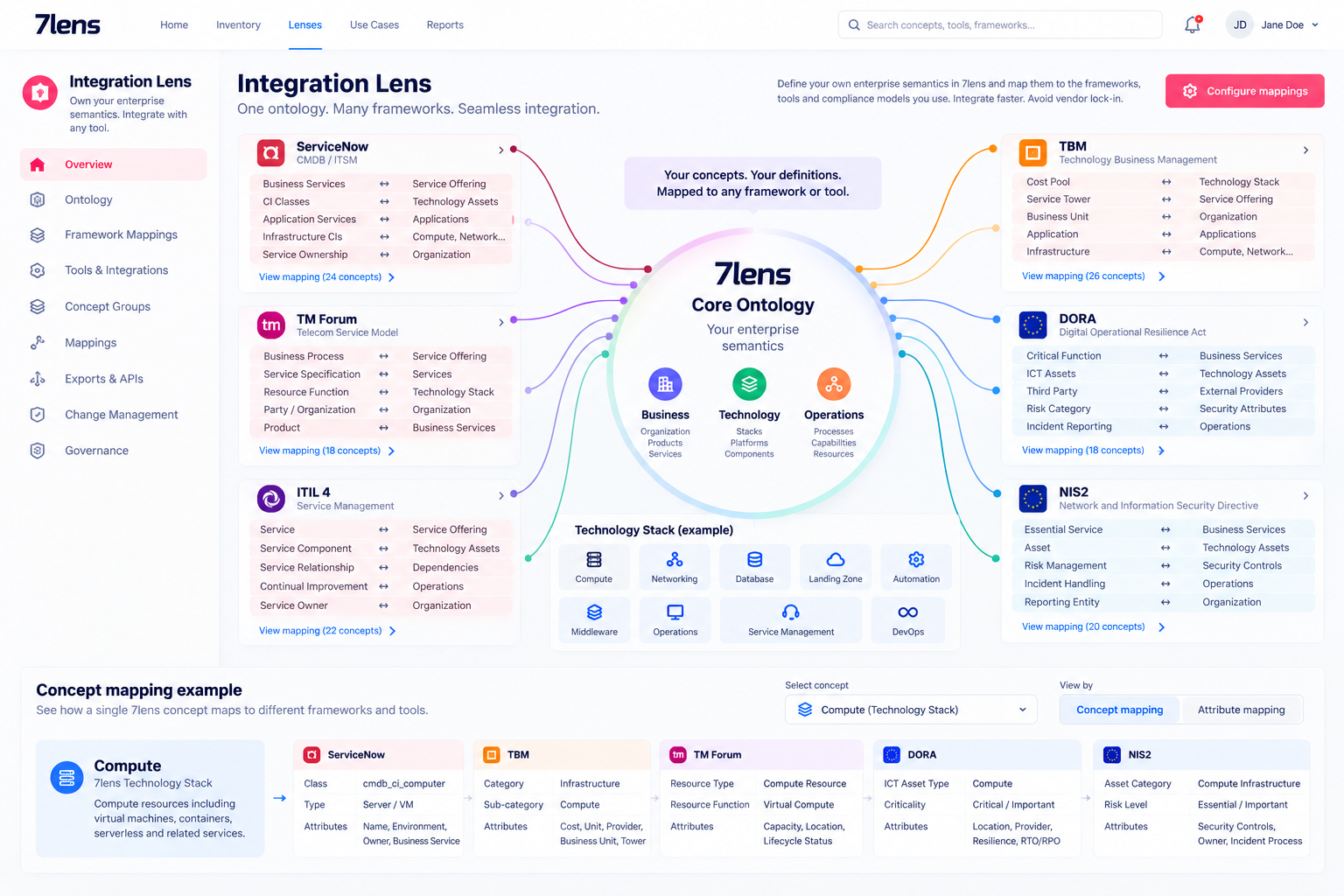
Different vendors impose different terminology and data models. The CFO’s FinOps platform, the CTO’s ServiceNow, security’s platform or CMDB, different business-service platforms and regulatory frameworks each come with their own vocabulary. Each platform makes the organization redefine Technologies, Applications, Organizations, Geographies, Companies, Business domains, Services and other concepts. Over time enterprise semantics fragment across vendors, creating dependency and painful migrations.
What 7lens connects
7lens becomes the organization’s core semantic layer. The customer defines its own canonical concepts in 7lens, this is how our organization defines an application, a service or a business domain, and external tools and frameworks are mapped to those concepts. The customer need not change its enterprise language each time it adopts a tool.
- Technologies
- Applications
- Organizations
- Geographies
- Companies
- Business domains
- Services
- Groups
- Enterprise ontology
- ServiceNow
- FinOps
- TBM
- FOCUS
- DORA
- Other mappings
The outcome
The external system sees the structure and terminology it requires, while the enterprise retains ownership of its underlying semantic model. If the organization later swaps ServiceNow for another CMDB, or one FinOps platform for another, it does not redefine its ontology. Only the mapping changes; the core enterprise definition stays the same.
The value
Own your ontology. Own your semantics. Integrate with any tool. Change vendors without redefining your enterprise. This is the vendor-lock-in-avoidance use case.
Automation & AIOps ROI Lens
Measure the operation. Understand what automation and AI are actually delivering.
Who is it for?
CIO, CTO, Operations leadership, Automation and AIOps teams, and the CFO.
The problem
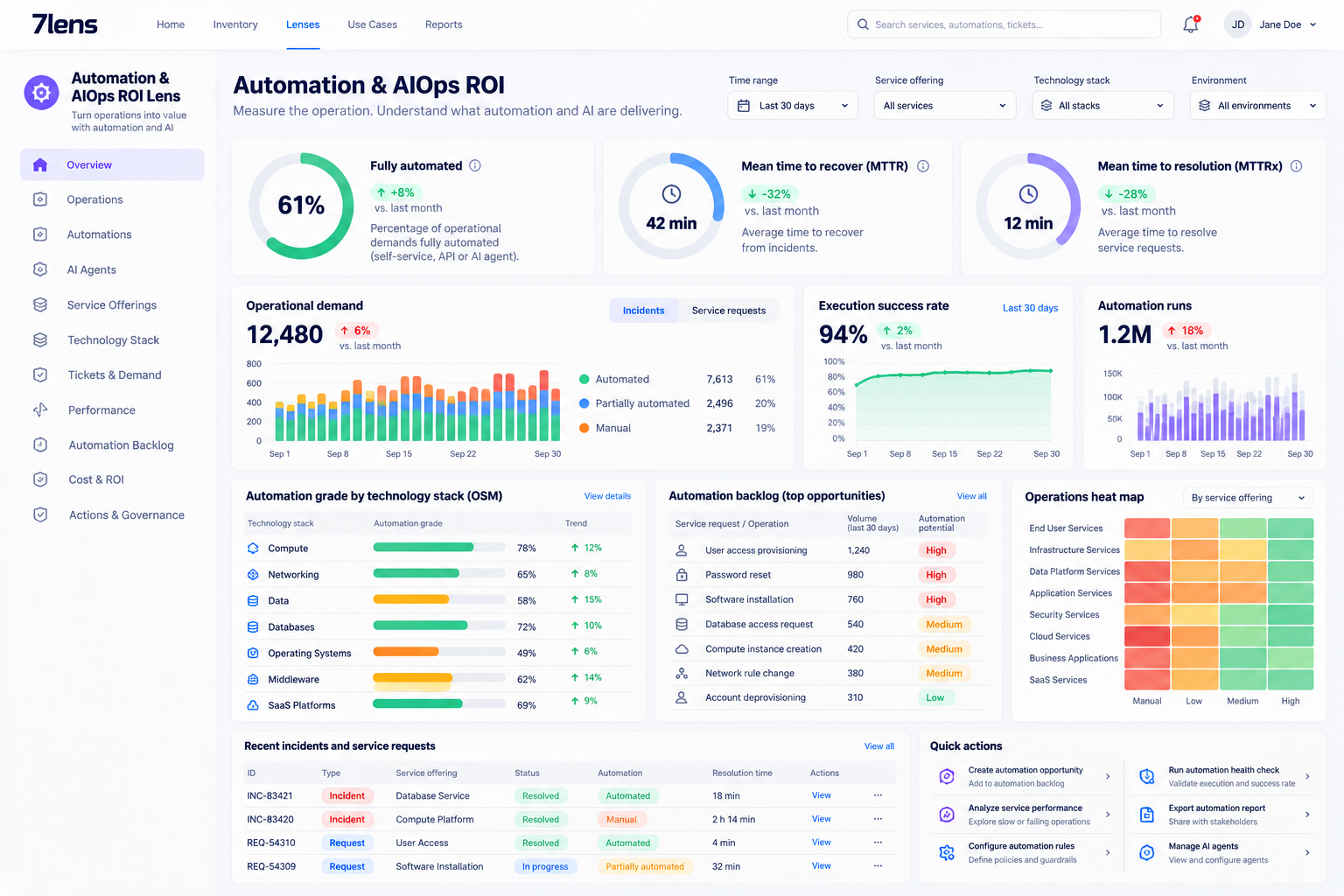
Organizations invest heavily, sometimes millions, in automation, AIOps, AI agents, self-service and operational tooling, but they struggle to demonstrate return. They know they have 500 automations but cannot easily answer: how much of our operation is actually automated? Which automations work? Which services are automated? Which demands are still manual? How fast are automated services delivered? Where are people still doing repetitive operational work? What should we automate next? What ROI are we getting? The data exists, but it is distributed across ticketing, support, operations and automation platforms.
What 7lens connects
The key concept is that an automation is an Asset, recognized by its Asset Type and one Offering of that Service. It is described via attributes and connected to the existing 7lens Technology model. This yields a common model that lets 7lens measure the operation end to end rather than measuring automation separately from the services it supports.
- Automations
- AI agents
- Service offerings
- Services
- Technology
- Tickets and demand
- Execution metrics
- Ticket / Demand
- Service Offering
- Service / Technology
- Automation
- AI Agent
The outcome
You get an overall view of the organization’s degree of automation and operational performance. Heat maps can show high-volume operations, operations with low automation, poor-performing automations, highly automated services and manual operational hotspots. This creates an automation backlog so engineering can decide what to automate traditionally, automate with AI agents, redesign or leave manual.
The value
Connect automation investment to operational performance, human effort, cost and ROI. Leadership sees whether past automation investments deliver value and where to invest next. It also provides evidence for negotiating operational contracts: if you are paying for Level 1 work that is demonstrably automated, there is evidence to challenge that cost structure and redirect people to higher-value work. The lens can demonstrate improvements in cost, automation level, operational quality, Mean Time to Recover, Mean Time to Resolve, human effort and service delivery speed. Do not just measure automation. Measure the operation, and understand what automation and AI are doing to it.
AI Lens
Help AI understand your company.
Who is it for?
Teams deploying autonomous AI agents, plus the security and platform owners accountable for what those agents can reach and change. This lens is primarily consumed by machines, not by a person at a dashboard.
The problem
Autonomous agents are being given control of enterprise systems before they understand the enterprise. Without a governed reading of the Context — the organization, business structure, applications, technology, relationships, classifications and permissions — an agent cannot know what an action means or what it is allowed to touch.
Give your agents an understanding of your enterprise before you give them control of it.
What 7lens connects
The AI Lens gives an AI agent a governed understanding of the enterprise Context: the relevant organization, business structure, applications, technology, relationships, classifications, permissions, and the context needed to understand what an action means. Agents consume it through the API and MCP, under the customer’s permissions and audit trail.
- Organization
- Business structure
- Applications
- Technology
- Relationships
- Classifications
- Permissions
- Action context
- Agent
- API / MCP
- Context
- Permissions
- Audited action
The outcome
An autonomous agent understands the enterprise before it acts: what it can reach and change, what each action means, and the permissions and audit that bound it. Lenses 1–6 are built primarily for people with API/MCP also available; Lens 7 is built primarily for AI agents, with API and MCP as the principal consumption mechanism.
The value
Give your agents an understanding of your enterprise before you give them control of it. The Lens is consumed machine-to-machine through API and MCP, under the customer’s permissions and audit model — not as another dashboard.